After experiencing an incident with a service using DNS-based load balancing where a domain resolves to multiple IP addresses, but one of those IPs was returning HTTP 500 errors. I investigated how different browsers handle DNS resolution and failover.
This deep dive explores DNS caching, IP failover behavior, and the differences between Chrome and Firefox.
How DNS Resolution Works
Domain Name System (DNS) maps human-friendly domain names to numerical IP addresses that computers use to connect to each other.
When you type a URL into your browser, a complex resolution process happens behind the scenes.
Here's the typical flow when a user types www.example.com in their browser:
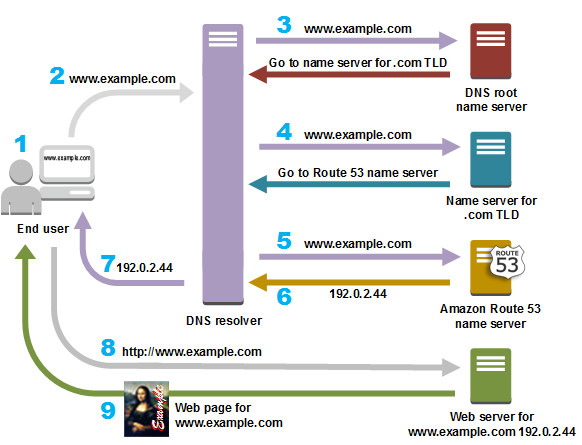
- The user types
www.example.comin their browser - The browser sends a DNS request to the DNS resolver
- The resolver queries the root name server
- The resolver queries the TLD name server
- The resolver queries the authoritative name server
- The resolver returns the corresponding IP addresses to the browser
- The browser sends an HTTP request to the IP address
- The web server returns the requested content
The Role of System APIs
To send DNS requests, browsers typically use native system APIs like getaddrinfo. Both Chrome and Firefox rely on these APIs by default.
However, Chromium has implemented its own built-in DNS resolver client to avoid native OS APIs in certain scenarios.
Chrome switches between its built-in DNS resolver and the system API depending on user configuration.
This means that all browsers are impacted by OS DNS cache, except Chrome in some specific cases.
What IP Addresses Do Browsers Get?
Both Chrome and Firefox provide tools to inspect DNS lookups:
- Chrome:
chrome://net-internals/#dns - Firefox:
about:networking#dnslookuptool
I ran multiple experiments on domains that resolve to multiple IP addresses to understand if:
- Browsers get multiple IPs from DNS lookups
- Browsers get the same list after clearing the cache
- IPs are ordered in a way that suggests prioritization
Experiment Results
After clearing the browser DNS cache and performing multiple lookups, I observed:
- IP address lists always contain 8 results
- IP address lists are ordered differently each time
- Different IP addresses appear after clearing the DNS cache (13 different addresses across experiments)
The random ordering suggests that the DNS resolver (in this case, AWS infrastructure) implements load balancing by rotating IP addresses in the response. Browsers typically attempt connections in the order received from the DNS resolver.
Do Browsers Fallback to Other IPs?
This was the critical question: if one IP is unavailable, will browsers automatically try another one from the DNS response?
Test Protocol
I set up a controlled test by:
- Adding two IPs to
/etc/hosts:127.0.0.1(local web server) and192.168.8.1(router) - Clearing the browser DNS cache
- Testing different scenarios: both servers up, one down, one returning errors, one timing out
Results
| Scenario | Chrome Behavior | Firefox Behavior |
|---|---|---|
| Both IPs are UP | Reaches 127.0.0.1 | Reaches 127.0.0.1 |
| 127.0.0.1 is DOWN | Falls back to 192.168.8.1 | Falls back to 192.168.8.1 |
| 127.0.0.1 returns 500 | Reaches 127.0.0.1 (no fallback) | Reaches 127.0.0.1 (no fallback) |
| 127.0.0.1 returns 408 (Request Timeout) | Reaches 127.0.0.1 (no fallback) | Reaches 127.0.0.1 (no fallback) |
Both browsers only fallback to another IP when the TCP connection fails
(server unreachable at the network level). They do NOT fallback when the TCP connection
succeeds but the HTTP request fails (500 error) or times out (408 error).
Why This Happens: TCP vs HTTP Layer
This behavior is tied to the TCP protocol level. DNS fallback is a
TCP-level mechanism browsers will only try the next IP address if the TCP three-way
handshake fails (connection refused, network unreachable, etc.). Once a TCP connection
is established, the browser considers it has successfully connected to the server,
regardless of what happens at the HTTP layer afterwards.
This means that HTTP-level failures whether 5xx server errors or 408 request timeouts
do not trigger DNS fallback. From the browser's perspective, it successfully reached
the server; any issues after that are application-level problems, not network connectivity
issues.
DNS Caching in Browsers
DNS caching happens at every level: browser, operating system, and DNS servers. Understanding browser-level caching is crucial for debugging network issues.
| Browser Configuration | Cache Duration |
|---|---|
| Chrome with built-in DNS resolver | Uses TTL from resolver response (minimum 60s) |
| Chrome with system DNS resolver | 60 seconds |
| Firefox | 60 seconds (configurable via network.dnsCacheExpiration) |
Firefox users can view DNS cache settings by typing about:config in the address bar and searching for DNS-related variables.
Can We Control DNS with Browser APIs?
Unfortunately, there is no DNS API available in browser JavaScript for regular web applications.
The only DNS APIs I found are in the context of Firefox extensions, which are not accessible to standard web applications.
This means web developers cannot implement custom IP fallback strategies or DNS resolution logic from JavaScript.
We're at the mercy of browser and OS DNS behaviors, with no programmatic control over how DNS queries are resolved or cached.
Published: October 7, 2022